
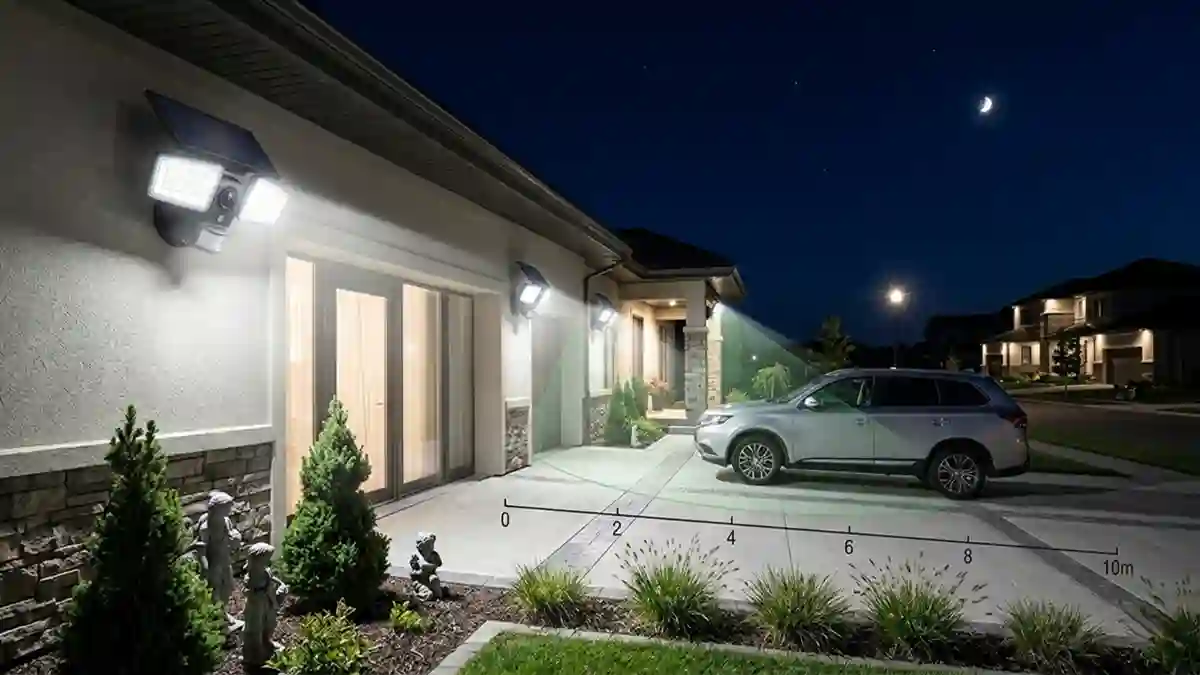
AI-driven solar security camera light looks convenient, but power sharing and FOV geometry matter. An engineer’s guide to when dual units actually work.
A practical engineering analysis of combined solar security camera lights — covering power sharing constraints, field-of-view geometry conflicts, AI-enhanced detection features, storage considerations, and the conditions under which a dual-function unit is the right choice versus separate systems. Written by a Registered Professional Engineer (PEC ELECTRO/15141).
Solar security camera lights powered by solar panels — one unit with an integrated solar panel, LED array, PIR sensor, and camera — are one of the faster-growing product categories in outdoor security. The convenience argument is straightforward: one mount, one cable-free unit, one app to manage everything.
The engineering argument is more nuanced. Combining a camera and a security light in a single unit involves tradeoffs that separate systems don’t have — shared battery capacity, potential field-of-view conflicts between the camera and the light cone, and image quality limitations imposed by the housing design. Whether those tradeoffs matter for your application depends on what you’re actually trying to accomplish.
This guide breaks down the engineering reality of dual-function units and gives you a clear decision framework for choosing between combined and separate systems.
For the underlying security light specifications, the solar security lights hub guide and the LED vs solar security lights comparison cover those in detail.
1. How Dual-Function Solar Security Camera Lights Work
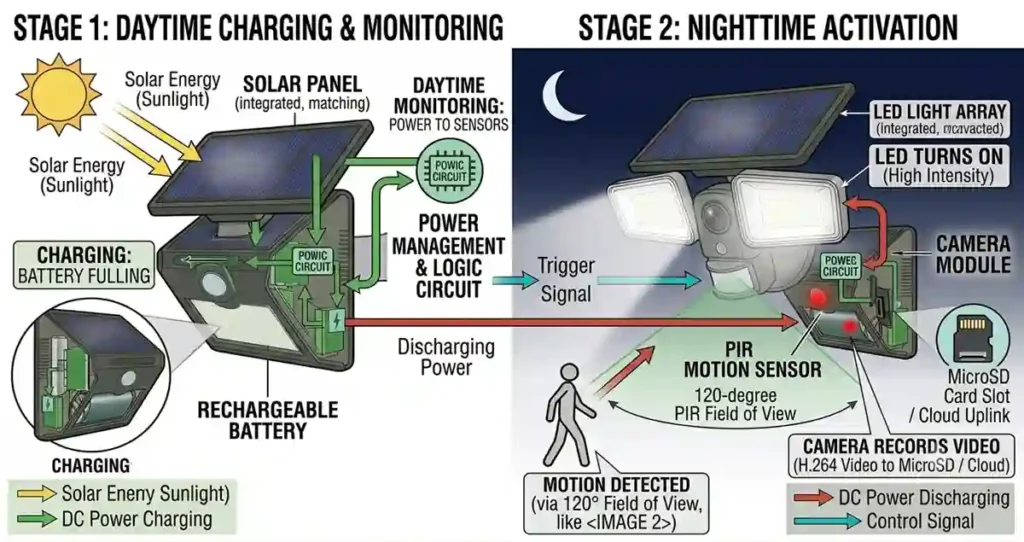
A combined solar security camera light integrates five subsystems into a single housing:
Solar panel: charges the internal battery. Usually 5–10W depending on unit size.
Rechargeable battery: typically 5000–10,000 mAh in quality units — larger than standalone security lights because it powers both the LED array and the camera.
LED array: the security light component. Usually 400–1500 lm in combined units — somewhat lower than dedicated security lights at the same price point, because battery capacity is shared.
PIR sensor: triggers both the LED array and the camera recording simultaneously when motion is detected.
Camera module: records video (typically 1080p–2K resolution) with onboard storage (SD card) or cloud upload via WiFi.
The operating sequence: PIR detects motion → LED activates to full brightness → camera begins recording → footage captured under LED illumination → LED returns to standby after set time → camera stops recording and saves clip.
2. The Power Sharing Constraint
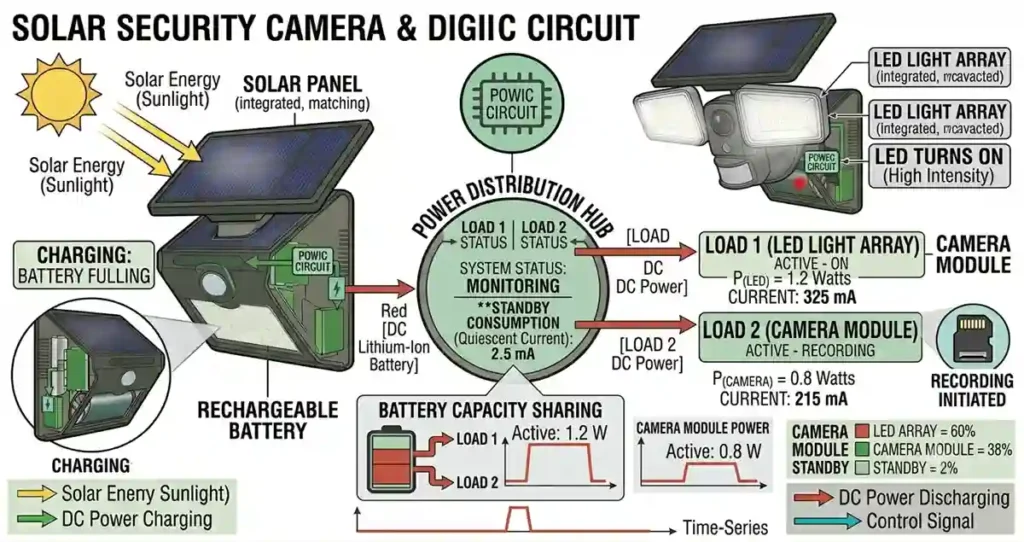
This is where most product listings are misleading. A dual-function unit has one battery serving two loads: the LED array (high current draw during activation) and the camera (continuous low-power draw for standby, higher draw during active recording and WiFi transmission).
| Load | Standby Current | Active Current | Impact on Battery |
| LED array (1000 lm) | 50–100 mA (dim mode) | 800–1200 mA (full bright) | High — short burst duration |
| Camera (1080p WiFi) | 50–150 mA (standby) | 300–600 mA (recording+WiFi) | Medium — continuous drain |
| Combined (triggered event) | 100–250 mA total | 1100–1800 mA total | Significantly higher than light-only |
The practical implication: a combined unit with a 5000 mAh battery does not have 5000 mAh available for the light. The camera’s continuous standby draw and periodic recording events consume a meaningful portion of that capacity throughout the night. A standalone 5000 mAh security light has that full capacity for the LED array only.
Engineer’s Note: When comparing combined units to standalone security lights, don’t compare lithium battery mAh directly. A 6000 mAh combined unit may deliver less effective runtime than a 3000 mAh standalone light — the camera’s continuous standby draw reduces what’s available for the LED. Look for combined units that specify separate power management for camera and light subsystems. Some quality units use independent lithium battery allocation for each.
3. Field-of-View Geometry: Light vs Camera
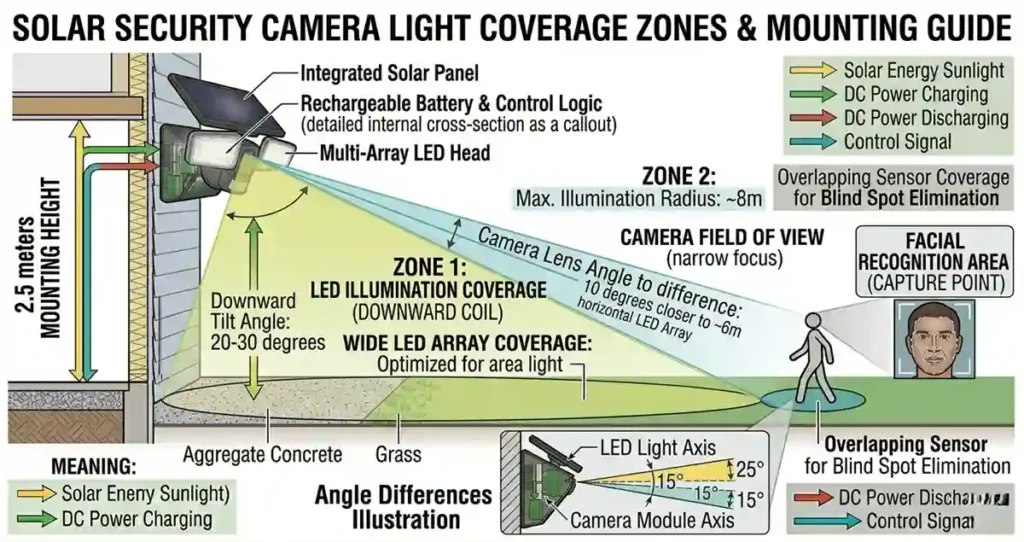
Security lights and security cameras have different optimal geometry — and in a combined unit, you can only position the housing in one orientation.
A security light performs best mounted high (2.5–3m) with the LED array angled downward to illuminate the coverage area. Maximum lumen density at ground level, good detection zone geometry.
A security camera performs best at a height that captures face-level imagery — typically 2–2.5m, with the camera angled slightly downward to capture approaching persons at face height rather than top-of-head.
The conflict: mounting at 3m for optimal light performance puts the camera above ideal face-capture height. Mounting at 2m for optimal camera performance puts the light too low for effective coverage area. Combined units require a compromise — typically 2.5m, which is acceptable for both but optimal for neither.
Field Note: I reviewed three solar security camera light installations in which the homeowner was unhappy with either the lighting coverage or the camera footage quality. In two cases, the compromise mounting height was the issue — the camera captured good face-level footage, but the light coverage was limited. In the third case, the reverse. In all three cases, a dedicated light at 3m and a dedicated camera at 2.2m would have solved both problems. The additional mounting hardware cost less than the combined unit, and both subsystems performed at their design optimum.
4. AI-Enhanced Detection in Solar Camera Lights
This is an area where the dual-function category has a genuine engineering advantage over standalone security lights. Camera-based AI detection — available in higher-end combined units — can distinguish between a person, a vehicle, an animal, and irrelevant motion like vegetation.
Standard PIR sensors detect any infrared change in the detection zone — a cat, a blown leaf, a passing vehicle on a road behind the fence. AI-powered camera detection processes the actual video frame to classify the detected object before triggering the full alarm response.
The practical result: fewer false triggers, more meaningful alerts, and the ability to set differentiated responses — full brightness for a detected person, no response for a detected animal, for example.
This AI classification capability is only possible with a camera that can process video frames — it can’t be added to a PIR-only security light. It’s the one feature where a combined unit offers something a standalone security light genuinely cannot replicate.
Engineer’s Note: AI object classification in solar camera lights requires either onboard processing (edge AI — faster, no internet dependency) or cloud processing (requires WiFi and a subscription). For locations with reliable WiFi, cloud AI generally offers more accurate classification and is updated over time. For remote locations or those with unreliable internet, edge AI is the more practical choice. Verify which processing method a specific unit uses before purchase.
5. Storage: SD Card vs Cloud
Combined solar security camera lights store footage either locally (SD card) or in the cloud (requires WiFi and typically a subscription). This is an important decision point separate from the light/camera hardware.
SD Card Storage
Local storage. No subscription cost. No internet dependency. Maximum storage is limited by card capacity (typically 32–128 GB). Footage is overwritten when the card is full. Physical access to the unit is required to retrieve footage. Risk: if the unit is tampered with or stolen, the footage goes with it.
Cloud Storage
Remote storage. Subscription cost (typically $3–10/month per camera). Requires reliable WiFi at the mounting location. Footage survives unit theft or damage. Accessible remotely from any device. Risk: service discontinuation, subscription cost increase, privacy considerations regarding footage held by a third party.
For most residential applications, a hybrid approach — SD card local storage with cloud backup for significant events — provides the best balance of cost, reliability, and footage security.
6. Combined vs Separate Systems: Decision Framework
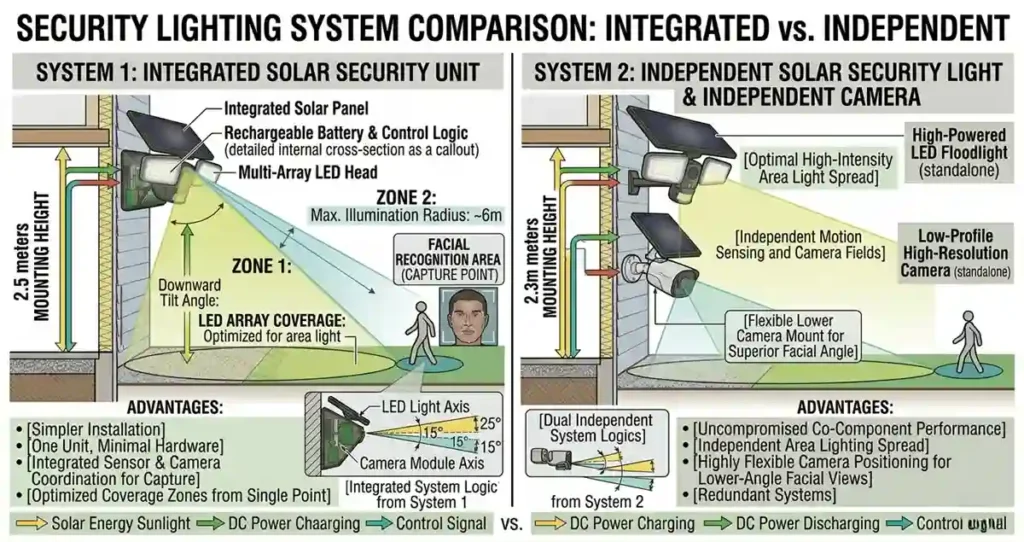
| Scenario | Combined Unit | Separate Systems |
| Limited mounting points | ✓ One mount serves both functions | ✗ Requires two separate mount points |
| No cable access | ✓ Fully wireless | ✓ Solar light is wireless; camera may need cable |
| High lumen requirement (1500+ lm) | ✗ Battery sharing limits output | ✓ Dedicated light can hit higher output |
| Face-capture camera quality critical | ✗ Compromise mounting height | ✓ Camera mounted at optimal height independently |
| AI motion classification needed | ✓ Available in quality combined units | ✗ PIR-only lights can’t classify object type |
| Budget-constrained | ✓ One unit vs two | ✗ Two units, two mounts |
| Commercial / high-security | ✗ Consumer-grade combined units not commercial spec | ✓ Commercial-grade components selected independently |
7. What to Verify Before Buying a Combined Unit
Battery capacity and how it’s allocated between camera and light subsystems
Whether the unit specifies camera standby current draw separately from LED current draw
Camera resolution and night vision range (separate from LED illumination range)
AI detection capability: object classification, edge vs cloud processing, subscription requirements
Storage options: SD card slot size limit, cloud service cost and terms
WiFi connectivity: 2.4GHz only or dual-band — relevant for range from router
IP rating: IP65 minimum for any fully exposed location
App platform: iOS/Android compatibility, local network access if cloud service is discontinued
Frequently Asked Questions
Are solar security camera lights good enough for home security?
For typical residential perimeter monitoring — recording events, receiving motion alerts, deterring opportunistic intrusion — quality combined units are adequate. For applications requiring high-definition face capture at range, sustained high-lumen output, or commercial-grade reliability, separate dedicated systems are the more appropriate engineering choice.
How long do solar security camera lights record?
Most units record event-triggered clips of 20–60 seconds per trigger. Continuous recording is possible in some units but significantly increases battery drain and storage requirements. Event-triggered recording is the practical default for solar-powered combined units — it balances storage capacity, battery life, and the ability to review meaningful events without hours of empty footage.
Do combined solar security camera lights work without WiFi?
The LED and PIR functions work without WiFi. Local SD card recording also works without WiFi. Remote viewing, cloud storage, and push notifications require WiFi. Some units support local network access (LAN) without internet, allowing footage review on a local device without a cloud subscription. Check the specific unit’s offline capability before purchase if WiFi reliability is a concern.
Can AI detection in solar camera lights replace a PIR sensor?
In some higher-end units, yes — camera-based AI detection replaces the PIR sensor entirely, using video analysis to detect motion rather than infrared change. This eliminates false triggers from temperature changes and provides classification capability. The tradeoff is higher continuous power consumption (the camera is always active rather than just the PIR sensor) and dependence on onboard processing or internet connectivity. It’s a genuine engineering advancement, not marketing — but it requires adequate battery and panel sizing to support the always-on camera operation.
What’s the best mounting height for a solar security camera light?
2.5m is the practical compromise for combined units. At this height, the LED coverage area is adequate for most residential applications, and the camera captures a useful field of view with reasonable face-level imagery. If you have flexibility, 2.2–2.4m optimises for camera quality; 2.8–3m optimises for light coverage. The choice depends on whether surveillance quality or illumination coverage is the higher priority for your specific location.
Final Thoughts
Combined solar security camera lights are a practical solution when mounting constraints limit you to a single location, when AI object classification is a priority, or when budget dictates a single unit over two separate ones.
They’re a compromise when high lumen output is required, when camera image quality at range is critical, or when commercial-grade reliability is a specification requirement.
The honest engineering answer is that separate systems — a dedicated solar security light at optimal mounting height and a dedicated camera at optimal face-capture height — perform better independently. Whether that performance difference justifies the additional cost and mounting complexity is a decision that depends on your specific security requirements and site constraints.
For the full context on solar security light specifications without the camera component, the solar security lights guide and the LED Solar Security Lights: Efficiency, Placement & Motion Zones – SolarVision AIare the reference articles for this cluster.
Related guides on SolarVisionAI.com
Solar Fence Post Lights: Cap Sizes, Types & Install Guide
Solar Charge Controller: The Complete Guide
MC4 Connectors: Solar Safety & Installation Guide
Solar Panel Types, Efficiency & Benefits
Commercial Solar Panel Installation: Engineering Guide
Commercial Solar Panel Installation — solarvisionai.com/commercial-solar-panel-installation/